<?xml version="1.0" encoding="ISO-8859-1"?>
<feed version="0.3" xmlns="http://purl.org/atom/ns#" xml:lang="en-US">
	<title>So Long, and Thanks for All the Fish - Alexandre Boeglin's Web Page</title>
	<link rel="alternate" type="text/html" href="http://www.boeglin.org/blog/index.php" />
	<modified>2012-05-19T02:33:05Z</modified>
	<author>
		<name>Alexandre Boeglin</name>
	</author>
	<copyright>Copyright 2012, Alexandre Boeglin</copyright>
	<generator url="http://www.sourceforge.net/projects/sphpblog" version="0.6.0">SPHPBLOG</generator>
	<entry>
		<title>Handling magnet URIs with w3m</title>
		<link rel="alternate" type="text/html" href="http://www.boeglin.org/blog/index.php?entry=entry120314-214917" />
		<content type="text/html" mode="escaped"><![CDATA[Since <a href="https://thepiratebay.se/" target="_blank" >The Pirate Bay</a> moved from distributing torrent files to providing magnet links only, it became impractical to browse using w3m.<br />Here&#039;s a fix.<br /><br />First, you&#039;ll need the following lines in your <code>~/.w3m/config</code> file: <pre>urimethodmap ~/.w3m/urimethodmap<br />cgi_bin ~/.w3m/cgi-bin</pre><br />1st one points to a file that describes how to handle particular URI schemes.<br />2nd one points to a folder that will contain cgi scripts that w3m can handle on its own, acting as a HTTP server.<br /><br />Then, you&#039;ll need to add a handler for magnet URIs in <code>~/.w3m/urimethodmap</code>: <pre>magnet: file:/cgi-bin/magnet.py?%s</pre><br />And finally, a script that will handle the URIs, named <code>~/.w3m/cgi-bin/magnet.py</code>: <pre>#!/usr/bin/python<br /># coding=utf-8<br /><br />import sys<br />import os<br />import subprocess<br /><br />uri = os.environ.get(&#039;QUERY_STRING&#039;)<br />referer = os.environ.get(&#039;HTTP_REFERER&#039;)<br /><br />if not uri:<br />    print<br />    print &quot;Error: No URI&quot;<br />    sys.exit()<br /><br />cmd_list = (&quot;transmission-remote&quot;, &quot;-a&quot;, uri)<br /><br />subprocess.call(cmd_list)<br /><br />if referer:<br />    print &quot;HTTP/1.1 301 Moved Permanently&quot;<br />    print &quot;Location: %s&quot; % referer</pre><br />Don&#039;t forget to <code>chmod +x ~/.w3m/cgi-bin/magnet.py</code>, modify the <code>cmd_list</code> tuple to match your host, port, and authentication parameters, and you should be set. Hitting &quot;Enter&quot; on a magnet link should now add it to your queue.]]></content>
		<id>http://www.boeglin.org/blog/index.php?entry=entry120314-214917</id>
		<issued>2012-03-14T00:00:00Z</issued>
		<modified>2012-03-14T00:00:00Z</modified>
	</entry>
	<entry>
		<title>How to flash a PC 4870 for a Mac Pro, using only Mac OS X</title>
		<link rel="alternate" type="text/html" href="http://www.boeglin.org/blog/index.php?entry=entry090918-031702" />
		<content type="text/html" mode="escaped"><![CDATA[This solution is so simple it will blow your mind away. Twice.<br /><br />I have tested it on my 2006 Mac Pro, using a Sapphire 4870 with 512MB VRAM (early model, based on ATI&#039;s reference design). The machine is running Snow Leopard 10.6.1.<br /><br />The test might be a little biased, as I originally installed Snow Leopard using the 4870 card. I only reflashed it with its original non-EFI BIOS for the purpose of this test.<br /><br />You&#039;ll need the <a href="http://support.apple.com/kb/DL938" target="_blank" >iMac Graphics Update 1.0.2</a> and <a href="http://www.charlessoft.com/" target="_blank" >Pacifist</a>.<br /><br />First, mount the graphics update image and use Pacifist to open it. You&#039;ll need to extract two files from here, using administrator privileges: ATIROMFlasher.kext and ATIFacelessFlash.app.<br /><br />After extracting them, we&#039;ll first need to make sure the kext is able to load. Open a Terminal, and run &quot;<code>sudo kextutil -nt ATIROMFlasher.kext</code>&quot; to check whatever problems it might have.<br /><br />On my system, it complained about authentication failures, and also showed a few warnings. The warnings can be ignored, but the auth issues have to be fixed, using those two commands: &quot;<code>sudo chown -R root:wheel ATIROMFlasher.kext</code>&quot; and &quot;<code>sudo chmod -R 644 ATIROMFlasher.kext</code>&quot;.<br /><br />Then, we&#039;ll remove the iMac firmwares from the archive: &quot;<code>sudo rm ATIFacelessFlash.app/Contents/Resources/*IMG</code>&quot; and add <a href="http://www.google.com/" target="_blank" >the correct firmware</a> to the flash utility: &quot;<code>sudo cp 4870.ROM ATIFacelessFlash.app/Contents/Resources/</code>&quot;.<br /><br />Note: removing the other firmwares is only important if you have other ATI cards in your mac. When ran, the ATIFacelessFlash application looks for all files in the Resources directory, tries to find a match in your PCI devices, and when one is found, initiates the flashing. So it could &quot;harm&quot; one of your other ATI cards. And I don&#039;t know how it behaves with a 4870X2 card, *IF* it is seen by the system as two cards with the same ID, *BUT* each need a different firmware for the card to work fine. From a quick disassembly, I&#039;d say that only the first one would be flashed.<br /><br />Now, time to plug the PC 4870 card in your machine. I had it in the 1st PCI Excodess slot, with no display connected, and the 7300 GT that originally came with my Mac in the 3rd PCI Excodess slot, driving my display. I don&#039;t know if MacOS X can boot without any graphics card, but if it does, you could also use ssh instead of a second card, if you have a second machine available.<br /><br />Restart your mac, and flash the card: &quot;<code>sudo kextload ATIROMFlasher.kext</code>&quot; (loads the interface to the card), &quot;<code>sudo open ATIFacelessFlash.app</code>&quot; (flashes the card. The app should appear in your Dock, wait for it to complete), &quot;<code>sudo kextunload ATIROMFlasher.kext</code>&quot; (unloads the interface).<br /><br />Then reboot once more, and voilą, your 4870 is now a Mac card. No need to boot a FreeDOS CD, no need to create a FAT partition on your disks.]]></content>
		<id>http://www.boeglin.org/blog/index.php?entry=entry090918-031702</id>
		<issued>2009-09-18T00:00:00Z</issued>
		<modified>2009-09-18T00:00:00Z</modified>
	</entry>
	<entry>
		<title>The Shitbot</title>
		<link rel="alternate" type="text/html" href="http://www.boeglin.org/blog/index.php?entry=entry090324-230226" />
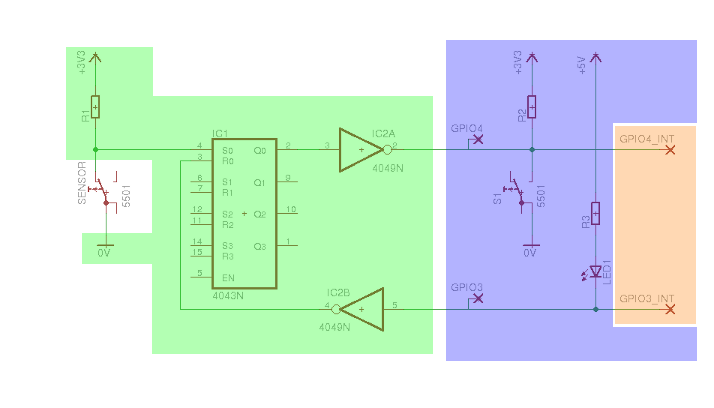
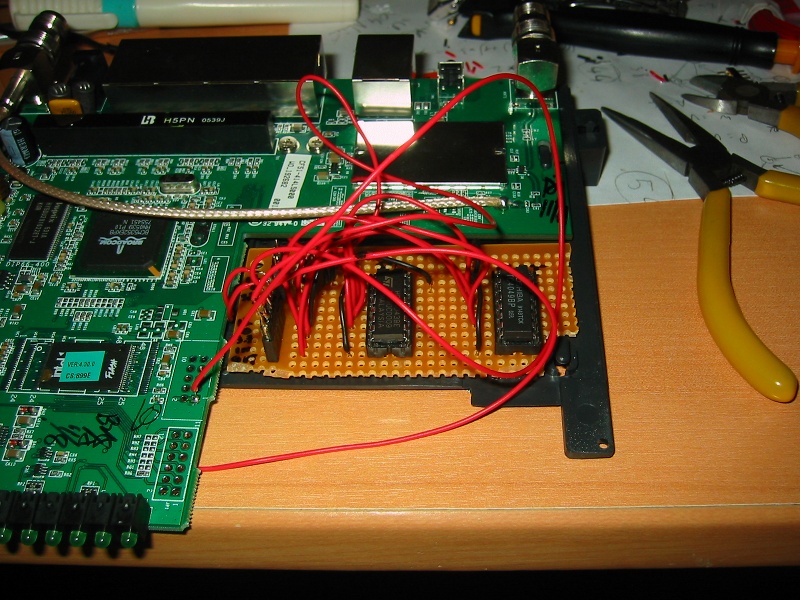
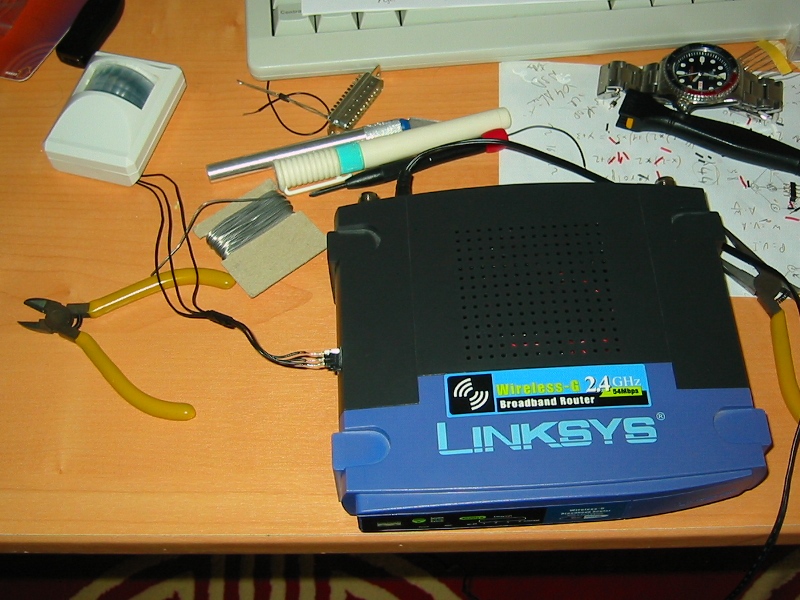
		<content type="text/html" mode="escaped"><![CDATA[The company I&#039;m currently working for is regularly growing, and it happens more often than before that you go to the bathroom, only to find it already occupied by someone else.<br /><br />Someone in the company pointed us to a <a href="http://blog.meebo.com/?p=833" target="_blank" >post on meebo&#039;s blog</a> where they described having the same issue, and the way they fixed it, but without any technical details. We of course agreed that it would be nice to have something like this, and I started to think about it.<br /><br />Since I had an unused Linksys WRT54GL, the project should be based on it. Then, I went shoppping for a cheap motion sensor, which happened to behave as a switch : current passes when it&#039;s idle, and the circuit is broken for about one second when a motion is detected.<br /><br />Since I didn&#039;t want to do massive polling, I decided to put an RS latch between the sensor and the motion detector. It ended up looking like this:<br /><br /><a href="javascript:openpopup('http://boeglin.org/static/shitbot/schematic.png',714,408,false);"><img src="http://boeglin.org/static/shitbot/schematic.png" width="500" height="286" border="0" alt="" /></a><br /><br />- the white part is the motion sensor,<br />- the green part is the RS latch and inverters I added<br />- the blue part is (probably) the Linksys PCB : GPIOs and hardwired component,<br />- the orange part is (probably) where the CPU is on the PCB, with its actual GPIO pins.<br /><br />I &quot;hijacked&quot; GPIO3 (the amber light) and GPIO4 (the Cisco button) to interface the CPU and the RS latch, and this is how it works:<br /><br />- when the system is idle, both R, S and Q are Low, GPIO4 and GPIO4_INT are high (just like when the Cisco button is not pressed),<br />- when some movement is detected, S becomes High for one second, Q becomes and stays High, and GPIO4 and GPIO4_INT become Low (just like they would when the button is pressed)<br />- when a GPIO3 is put to Low for a short moment, the LED blinks, R becomes High then Low again, but Q becomes and stays Low, and the system is back to idle mode (previously memorized movements are forgotten).<br /><br />Basically, the goal is: once a movement is detected, it is memorized until a reset is sent.<br /><br />I then did the soldering part, as can be seen on the two following pictures, and closed back the Linksys case (with a simple 3 pins connector added to its side, going to the sensor, for power supply and the switch-like output)<br /><br /><a href="javascript:openpopup('http://boeglin.org/static/shitbot/img_0046.jpg',800,600,false);"><img src="http://boeglin.org/static/shitbot/img_0046.jpg" width="500" height="375" border="0" alt="" /></a><br /><br /><a href="javascript:openpopup('http://boeglin.org/static/shitbot/img_0047.jpg',800,600,false);"><img src="http://boeglin.org/static/shitbot/img_0047.jpg" width="500" height="375" border="0" alt="" /></a><br /><br />I finally built a simple kernel driver, compiled it using <a href="http://openwrt.org/" target="_blank" >OpenWrt</a>&#039;s build system, that creates a file in /proc. When the file is read, it returns &quot;0&quot; if no movement was detected since the last reset, and &quot;1&quot; otherwise.<br /><br />Then, two simple CGI scripts were added to the mix to expose this /proc file through HTTP. As this device can act as a wireless client, talks HTTP, and does not require frequent polling, it can now be integrated with any intranet technology the company is or will be using.<br /><br />A <a href="http://boeglin.org/static/shitbot/kmod-shitbot_2.4.30-brcm-1_mipsel.ipk" target="_blank" >prebuilt binary package</a> and a <a href="http://boeglin.org/static/shitbot/shitbot_sources.tar.bz2" target="_blank" >source package</a> are available for the driver.]]></content>
		<id>http://www.boeglin.org/blog/index.php?entry=entry090324-230226</id>
		<issued>2009-03-24T00:00:00Z</issued>
		<modified>2009-03-24T00:00:00Z</modified>
	</entry>
	<entry>
		<title>Update: Mac Pro AHCI hack</title>
		<link rel="alternate" type="text/html" href="http://www.boeglin.org/blog/index.php?entry=entry090324-214016" />
		<content type="text/html" mode="escaped"><![CDATA[I recently received an email form Bela Lubkin, who pointed out some mistakes I made in my previous hack:<br /><br /><blockquote>In grub-0.97_macrpro_esb2_ahci_stage1.patch, I happened to randomly notice a bug. (Ran across it while googling information to get my Dell notebook w/Ubuntu 8.10 to use ahci rather than ata_piix driver...)<br /><br />The bug: you&#039;ve moved the setup of the stack segment register (%ss) after the setup of the stack pointer (%sp). I don&#039;t have full context (didn&#039;t bother to find the stage1.S full file you&#039;re patching), so I don&#039;t know if it&#039;s OK that you are pushing %edx onto [%old-ss:$STAGE1_STACKSEG]. But probably not. But even worse is the &quot;sti /* we&#039;re safe again */&quot;. Ancient 8086 mistake. You can&#039;t enable interrupts until the stack is setup correctly. Move the %ss setup code back to where it was.<br /><br />I assume you moved it because you wanted to preserve the fact that %ax == 0 on exit of this bit of code. Well, I did find the grub 0.97 source to make sure: both %al and %ah are subsequently overwritten before being used. You don&#039;t have to preserve it.<br /><br />You can save the whole push/pop %dx: find the comment &quot;%dl may have been clobbered ...&quot;, move your code immediately before its `popw %dx; pushw %dx&#039;. This does mean your hack isn&#039;t effective if grub is being booted from a floppy, but ... not a problem.<br /><br />You can also save a few more code bytes. I assume this is being compiled as 16-bit (8086) code, e.g. with &quot;.code16&quot; GNU `as` directive. Thus, the instructions `push %edx&#039; and `pop %edx&#039; need a code32 prefix; replace with `push %dx; pop %dx&#039;. Replace `mov $0xcfc,%dx&#039; with `mov $0xfc,%dl&#039;. Replace `xorl %eax,%eax&#039; with `xor %ax,%ax&#039;.</blockquote><br /><br />And he was even kind enough to send me a fix for these, so many thanks to him.<br /><br />Here are links for the <a href="http://boeglin.org/static/macpro/grub-0.97_macpro_esb2_ahci_stage1_new.patch" target="_blank" >new patch</a> he sent me, and an <a href="http://boeglin.org/static/macpro/stage1" target="_blank" >updated stage1 binary</a>.]]></content>
		<id>http://www.boeglin.org/blog/index.php?entry=entry090324-214016</id>
		<issued>2009-03-24T00:00:00Z</issued>
		<modified>2009-03-24T00:00:00Z</modified>
	</entry>
	<entry>
		<title>Enabling AHCI in legacy (BIOS) OS on a Mac Pro</title>
		<link rel="alternate" type="text/html" href="http://www.boeglin.org/blog/index.php?entry=entry071218-212838" />
		<content type="text/html" mode="escaped"><![CDATA[The Mac Pro is a really nice workstation, which comes with the really nice EFI instead of BIOS.<br /><br />EFI needs an adaptation layer (the Compatibility Support Module, or CSM) that emulates the BIOS, to be able to boot legacy OS, like Microsoft ones, or any GNU/Linux distribution without EFI support (which is nearly all of them, afaik).<br /><br />Unfortunately, the CSM provided by apple does not contain an AHCI OpRom, and has to put the disk controller into IDE mode, instead of using the (also really nice) AHCI mode (whereas the controller&#039;s default mode is AHCI, and MacOSX uses this mode).<br /><br />So far, Linux driver developers put the hack in the driver: when initialized, it puts back the controller to AHCI mode. But this does not work with other OS, so I had to put it at a lower level.<br /><br />As Apple&#039;s EFI part of BootCamp is quite simple (just &quot;chainloads&quot; to a legacy bootloader), I decided to use the <a href="http://www.gnu.org/software/grub/" target="_blank" >GNU GRUB</a> to load legacy OS, and modified it to put back the controller in AHCI mode before any OS tries to load a driver for it.<br /><br />Here is the <a href="http://boeglin.org/static/macpro/grub-0.97_macpro_esb2_ahci_stage1.patch" target="_blank" >patch</a>, and here is a <a href="http://boeglin.org/static/macpro/stage1" target="_blank" >stage1 binary</a> built from patched Grub 0.97 sources.<br /><br />Please note that this is extremely ugly! As I didn&#039;t want to spend too much time on this, I decided to go the fastest way: adding the hack as x86 assembly in stage1. But as stage1 has a really strict size constraint (must fit in the first block), I had to remove some other hacks from it, to be able to add mine in.<br /><br />UPDATE: This <a href="http://forum.onmac.net/showthread.php?t=2739" target="_blank" >OnMac.net forum thread</a> contains a bit more detailled information on how to set this up.<br /><br /><b>IMPORTANT UPDATE:</b> The patch posted here contains a few mistakes (the binary has been updated, and includes fixes). For a fixed version of the patch, please read this <a href="http://boeglin.org/blog/index.php?entry=entry090324-214016" target="_blank" >blog entry</a>.]]></content>
		<id>http://www.boeglin.org/blog/index.php?entry=entry071218-212838</id>
		<issued>2007-12-18T00:00:00Z</issued>
		<modified>2007-12-18T00:00:00Z</modified>
	</entry>
	<entry>
		<title>Intel 8051 control flow graph generator</title>
		<link rel="alternate" type="text/html" href="http://www.boeglin.org/blog/index.php?entry=entry071211-215156" />
		<content type="text/html" mode="escaped"><![CDATA[Here is a script I wrote about two years ago, that produces a graph (using <a href="http://www.graphviz.org/" target="_blank" >Graphviz</a>) of branches and calls from a 8051 hex file, disassembled with <a href="http://home.earthlink.net/~davesullins/software/dis51.html" target="_blank" >Dis51</a>. This µC can be found, for instance, in Cypress USB bridges, that load the firmware from USB when the device is plugged in, and are used for many kinds of applications (I have a DSL modem and a TV tuner that use them, for instance).<br /><br />It can be used like this:<br /><br /><i>dis51 -l [entrypoints list] &lt; firmware.hex &gt; firmware.a51<br />python graphviz_generator.py firmware.a51 [entrypoints list] &gt; graph.gv<br />dot -Tgif graph.gv &gt; firmware_graph.gif</i><br /><br />(&quot;entrypoints list&quot; being a list of whitespace separated addresses, like &quot;0x0000 0x0010&quot;, without the quotes)<br /><br />The graph will look as follows:<br /><br />- Red circles are functions (branches that update the stack pointer)<br />- Grey circles are RET statements (end of functions, also modify the SP)<br />- Blue circles are entrypoints<br />- Squares are normal branch instruction<br />- plain lines mean the branch is always taken (or when the branch condition is false)<br />- dashed lines mean the branch is taken if the branch condition is true (JZ, JNZ ...)<br />- red dashed lines mean a function call<br /><br />As a small picture usually talks more than a long text, so here is a <a href="http://boeglin.org/static/efa/firmware_graph.gif" target="_blank" >really BIG picture</a>.<br /><br />And finally, <a href="http://boeglin.org/static/efa/graphviz_generator.py" target="_blank" >the script</a>.]]></content>
		<id>http://www.boeglin.org/blog/index.php?entry=entry071211-215156</id>
		<issued>2007-12-11T00:00:00Z</issued>
		<modified>2007-12-11T00:00:00Z</modified>
	</entry>
	<entry>
		<title>WaveMixer RPM package</title>
		<link rel="alternate" type="text/html" href="http://www.boeglin.org/blog/index.php?entry=entry050704-014154" />
		<content type="text/html" mode="escaped"><![CDATA[<a href="http://wavemixer.sourceforge.net/" target="_blank" >WaveMixer</a> is a really nice looking and easy to use multitrack wave editor written by friends of mine. It uses really neat technology like GTK+, Gstreamer and LADSPA. I built the first <a href="http://boeglin.org/static/wavemixer/" target="_blank" >WaveMixer RPM package</a> for them, and I believe they are now handling them by themselves.<br /><br />Even if you&#039;re not into music authoring, you should really give their software a try, as it&#039;s so entertaining !]]></content>
		<id>http://www.boeglin.org/blog/index.php?entry=entry050704-014154</id>
		<issued>2005-07-03T00:00:00Z</issued>
		<modified>2005-07-03T00:00:00Z</modified>
	</entry>
	<entry>
		<title>GameCube hacks</title>
		<link rel="alternate" type="text/html" href="http://www.boeglin.org/blog/index.php?entry=entry050704-001159" />
		<content type="text/html" mode="escaped"><![CDATA[Right after I bought my Nintendo GameCube system, I read every available information about it, and I started to follow the activity of the homebrew community.<br /><br />Eventually, I also wrote little pieces of code.<br /><br />As usual, click the following link to get to my collection of <a href="http://boeglin.org/static/gc/" target="_blank" >homebrew works</a> for the GameCube.<br /><br />It includes :<br />- an updated Howto on how to cross-compile demos. It is updated compared to the original version, which was the only one available for a period of time, and which also quickly became outdated.<br />- a tool that converts any image to a C array or object which can be copied to the framebuffer address for direct display on the TV screen. An example program to display the image is also included.<br />- a tool that interfaces with the ripping dol that was found someday floating around on the Internet ... It runs on Linux and MacOS X and allows to backup your games to your PC.<br />- a tool that streams back the game backup to the console, using the ACL dol. This tool is available in two versions :<br /><br />- the first version has exactly the same features as the Windows version.<br />- the second version uses zlib. Every backup image is split in packets of 32kB and compressed, before being stored on the disk. When the streaming tool is required a specific file (the request contains the offset and size of the array that needs to be sent), it looks which blocks it needs, decompresses them on the fly, and sends the decompressed response to the console. This technique is really fast (bottleneck here is the network), it saves much diskspace (some backups shrink from 1.4GB to less than 400MB), and more important, it keeps the backup intact, as the compression is indeed non destructive (compared to the &quot;regular&quot; backup shrink tools, which simply rewrite the filesystem table and move the files).<br /><br /><b>Note : You are the only person responsible for the use you make of this software. Illegal usage is not encouraged by this webpage.</b>]]></content>
		<id>http://www.boeglin.org/blog/index.php?entry=entry050704-001159</id>
		<issued>2005-07-03T00:00:00Z</issued>
		<modified>2005-07-03T00:00:00Z</modified>
	</entry>
	<entry>
		<title>French Bluetooth introduction</title>
		<link rel="alternate" type="text/html" href="http://www.boeglin.org/blog/index.php?entry=entry050703-221742" />
		<content type="text/html" mode="escaped"><![CDATA[This is an introduction to the Bluetooth protocol stack, IP over Bluetooth, and seamless reconnection while moving a Bluetooth device among many access points. It is written in french.<br /><br />You can click here to read my <a href="http://boeglin.org/static/bluetooth/bluetooth.pdf" target="_blank" >French Bluetooth introduction</a>.]]></content>
		<id>http://www.boeglin.org/blog/index.php?entry=entry050703-221742</id>
		<issued>2005-07-03T00:00:00Z</issued>
		<modified>2005-07-03T00:00:00Z</modified>
	</entry>
	<entry>
		<title>Linupy 2.0.7 port to Yopy 3000</title>
		<link rel="alternate" type="text/html" href="http://www.boeglin.org/blog/index.php?entry=entry050703-221502" />
		<content type="text/html" mode="escaped"><![CDATA[The goal was to bring the latest distribution from Gmate to the Yopy 3000, as they didn&#039;t plan to do it themselves...<br /><br />Unfortunately, as the size of the (compressed) filesystem is over 17MBytes and the device only has 16MBytes of ROM, i had to move some parts of it to the MMC card. Thus, you&#039;ll have to have one in order to benefit from the full features of this distro.<br /><br />You can click here to get <a href="http://boeglin.org/static/linupy/" target="_blank" >Linupy 2.0.7 port to Yopy 3000</a>.]]></content>
		<id>http://www.boeglin.org/blog/index.php?entry=entry050703-221502</id>
		<issued>2005-07-03T00:00:00Z</issued>
		<modified>2005-07-03T00:00:00Z</modified>
	</entry>
</feed>